Stopping a ZigBee garage door opener from triggering twice
Our own gate motor sits at the end of the driveway, which is about the furthest point in the property from the coordinator. It worked — until it didn't. Every week or so a press would send the door halfway and stop it there, and the Home Assistant dashboard would sit there insisting everything was fine.
This is the write-up of what was actually going wrong and the ZHA quirk we wrote to fix it. We run it on our own units, and it is the reason we stopped answering this question one email at a time. The full source is below, MIT licensed, and you can download the file directly.
The symptom
One press of the button, two pulses at the motor. A garage door that receives a second pulse mid-travel stops where it is, so you get a door frozen halfway and an entity in Home Assistant that thinks it succeeded. It is worse the further the opener is from the coordinator, worse in bad weather, and — the part that makes it maddening to debug — completely unreproducible on the bench next to the stick.
Why it happens
It is three separate problems that all look like the same bug:
- The relay isn't momentary on its own. A garage motor wants a pulse: close the dry contact, open it again. ZHA drives it as a plain on/off switch, so how long the contact stays closed depends on the device's own inching setting — which is not something you want load-bearing, because a factory reset takes it with it.
- A marginal link gets the command retried. When an acknowledgement doesn't come back in time the command is sent again. The MCU received the first one perfectly well; it just couldn't get the ACK home. Now the motor has been pulsed twice.
- The Tuya MCU repeats itself. On a weak link it will re-report the same datapoint, and every report becomes a state change in Home Assistant — which re-fires anything you hung off that state.
Note that only the first of these is really about the device. The other two are what a long, lossy ZigBee hop does to any command that isn't idempotent, and pulsing a garage door is about as non-idempotent as home automation gets. Moving the coordinator or adding a repeater makes it rarer. It does not make it go away.
What ZHA does with this device out of the box
On our units (TS0601, manufacturer _TZE204_nklqjk62)
ZHA pairs the opener as a generic Tuya device and you get a switch that
latches rather than pulses. The reed contact that ships in the box doesn't
appear as an entity at all, because its datapoint isn't mapped to anything ZHA
knows how to render — so you lose the one thing that tells you whether the
door is actually open.
ZigBee2MQTT users have their own converter for this device and generally don't run into this. What follows is for ZHA.
What the quirk changes
- The pulse is implemented in software. ON, wait 0.8 s, OFF — so the pulse length is defined by the quirk and survives a factory reset of the device.
- A 3-second command debounce. A second command inside the window is swallowed and answered with a success status, so a retry, a double-tap or an over-eager automation costs you nothing. This is the one that saves the door.
- A 1.5-second report debounce. An identical
on_offreport inside the window is treated as the same event, not a new one, so the entity stops flapping. - OFF from outside is ignored. The relay is momentary and the quirk owns the off half of the pulse; an external OFF would only confuse the MCU.
- The contact sensor becomes a real entity. Datapoint 3 is
mapped to an IAS Zone cluster on endpoint 2, which gives you a proper
binary_sensorreporting true open/closed state — as opposed to the state your automation last assumed. - The switch entity actually gets created. A freshly paired device has an empty attribute cache, and ZHA can quietly skip building the entity when it can't read an initial value. The quirk seeds one.
Installing it
- Make a quirks directory if you don't have one, e.g.
/config/zha_quirks/, and point ZHA at it inconfiguration.yaml:zha: custom_quirks_path: /config/zha_quirks/ - Save the file below into that directory as
ts0601_garage_debounce.py. - Restart Home Assistant.
- Open the device in ZHA and choose Reconfigure. To confirm
the quirk took, check the device info: it should name
TuyaGarageSwitchTOas the quirk applied.
You should end up with a switch that pulses and a binary_sensor
for the contact. Automate against the binary sensor, not the switch — the
switch is a button, the sensor is the truth.
The quirk
"""
Debounced ZHA quirk for the Tuya TS0601 ZigBee garage door / gate opener.

Sold by Home Better as HB-GATE-01:
  https://homebetter.com.au/products/zigbee-garage-door-gate-opener/
Write-up, symptoms and install steps:
  https://homebetter.com.au/guides/zigbee-garage-door-opener-zha-quirk/

Why this exists: a gate motor is usually the furthest thing in the house from
the coordinator. On a marginal link the command gets retried and the Tuya MCU
re-reports the same datapoint, so one press becomes two pulses — and a garage
door that gets two pulses stops half open. This quirk makes the relay a real
momentary pulse, debounces both the command and the attribute report, and maps
the bundled contact sensor to a proper IAS Zone binary_sensor.

Drop it in your ZHA custom quirks path, restart Home Assistant, then
reconfigure the device. Provided as-is under the MIT licence.
"""

import asyncio
import time
from typing import Any, Dict, Optional, Union

from zigpy.profiles import zgp, zha
from zigpy.quirks import CustomDevice
import zigpy.types as t
from zigpy.zcl.clusters.general import Basic, GreenPowerProxy, Groups, Ota, Scenes, Time
from zigpy.zcl.clusters.security import IasZone
from zigpy.zcl import foundation

from zhaquirks.const import (
    DEVICE_TYPE,
    ENDPOINTS,
    INPUT_CLUSTERS,
    MODELS_INFO,
    OUTPUT_CLUSTERS,
    PROFILE_ID,
)

from zhaquirks.tuya import TuyaLocalCluster
from zhaquirks.tuya.mcu import DPToAttributeMapping, TuyaMCUCluster
from zhaquirks.tuya.ts0601_dimmer import TuyaOnOffNM

ZONE_TYPE = 0x0001

# ── Tuning ───────────────────────────────────────────────────────────────
# COMMAND_DEBOUNCE: how long after a pulse we ignore further presses. Must be
#   longer than one full pulse and longer than your ZHA retry window. 3s is
#   comfortable for a roller door; drop it if you genuinely need faster.
# REPORT_DEBOUNCE: window for collapsing identical on_off reports from the MCU.
# PULSE_SECONDS: how long the dry contact stays closed. Most motors want a
#   short pulse; lengthen only if yours misses it.
COMMAND_DEBOUNCE = 3.0
REPORT_DEBOUNCE = 1.5
PULSE_SECONDS = 0.8


class ContactSwitchCluster(TuyaLocalCluster, IasZone):
    """Tuya ContactSwitch Sensor."""

    _CONSTANT_ATTRIBUTES = {ZONE_TYPE: IasZone.ZoneType.Contact_Switch}

    def _update_attribute(self, attrid, value):
        self.debug("_update_attribute '%s': %s", attrid, value)
        super()._update_attribute(attrid, value)


class TuyaOnOffInching(TuyaOnOffNM):
    """Tuya OnOff Inching Switch with no manufacturer cluster."""

    def __init__(self, *args, **kwargs):
        super().__init__(*args, **kwargs)
        # A freshly paired device has an empty attribute cache, and ZHA can
        # silently skip creating the switch entity when it cannot read an
        # initial value. Seed a default (off) so on_off is readable from the
        # moment the cluster exists.
        self._update_attribute(0x0000, 0)

    def _update_attribute(self, attrid, value):
        if attrid == 0x0000:
            now = time.time()
            last_time = getattr(self, "_last_attr_time", 0.0)
            last_val = getattr(self, "_last_attr_val", None)

            # The MCU likes to repeat itself on a weak link. An identical
            # report inside the window is the same event, not a second one.
            if (now - last_time < REPORT_DEBOUNCE) and (value == last_val):
                self.debug("Duplicate attribute update debounced: %s", value)
                return

            self._last_attr_time = now
            self._last_attr_val = value

        super()._update_attribute(attrid, value)

    async def command(
        self,
        command_id: Union[foundation.GeneralCommand, int, t.uint8_t],
        *args,
        manufacturer: Optional[Union[int, t.uint16_t]] = None,
        expect_reply: bool = True,
        tries: int = 1,
        tsn: Optional[Union[int, t.uint8_t]] = None,
        **kwargs: Any,
    ):
        now = time.time()
        last_cmd_time = getattr(self, "_last_cmd_time", 0.0)

        # The debounce that actually saves the door. Answer SUCCESS rather than
        # raising: ZHA indexes the result, so it has to be the two-element
        # (status, status) shape a real command returns.
        if now - last_cmd_time < COMMAND_DEBOUNCE:
            self.debug("Command debounced to prevent spam")
            return (foundation.Status.SUCCESS, foundation.Status.SUCCESS)

        # The relay is momentary; the quirk owns the off half of the pulse, so
        # an OFF from outside is meaningless and would only confuse the MCU.
        if command_id == 0:
            return (foundation.Status.SUCCESS, foundation.Status.SUCCESS)

        if command_id == 1:
            self._last_cmd_time = now
            super_command = super().command

            async def execute_inching():
                # Inching in software, so the pulse length is ours and does not
                # depend on whatever the device's own inching setting happens
                # to be after a factory reset.
                try:
                    await super_command(
                        1, *args, manufacturer=manufacturer, expect_reply=False, tries=1, tsn=tsn, **kwargs
                    )
                    await asyncio.sleep(PULSE_SECONDS)
                    await super_command(
                        0, *args, manufacturer=manufacturer, expect_reply=False, tries=1, tsn=tsn, **kwargs
                    )
                except Exception as e:
                    self.debug("Inching execution error: %s", e)
                finally:
                    self._update_attribute(0x0000, 0)

            asyncio.create_task(execute_inching())

            # Return straight away; the pulse runs as a background task so the
            # service call never blocks and never times out.
            return (foundation.Status.SUCCESS, foundation.Status.SUCCESS)

        return await super().command(
            command_id, *args, manufacturer=manufacturer, expect_reply=expect_reply, tries=tries, tsn=tsn, **kwargs
        )


class TuyaGarageManufCluster(TuyaMCUCluster):
    """Tuya garage door opener."""

    attributes = TuyaMCUCluster.attributes.copy()
    attributes.update(
        {
            0xEF02: ("dp_2", t.uint32_t, True),
            0xEF04: ("dp_4", t.uint32_t, True),
            0xEF05: ("dp_5", t.uint32_t, True),
            0xEF0B: ("dp_11", t.Bool, True),
            0xEF0C: ("dp_12", t.enum8, True),
        }
    )

    dp_to_attribute: Dict[int, DPToAttributeMapping] = {
        # DP 1 is the relay, DP 3 is the reed contact. Mapping DP 3 onto an IAS
        # Zone on endpoint 2 is what turns "there is a sensor in the box" into
        # a real binary_sensor in Home Assistant.
        1: DPToAttributeMapping(TuyaOnOffInching.ep_attribute, "on_off"),
        2: DPToAttributeMapping(TuyaMCUCluster.ep_attribute, "dp_2"),
        3: DPToAttributeMapping(
            ContactSwitchCluster.ep_attribute,
            "zone_status",
            lambda x: IasZone.ZoneStatus.Alarm_1 if x else 0,
            endpoint_id=2,
        ),
        4: DPToAttributeMapping(TuyaMCUCluster.ep_attribute, "dp_4"),
        5: DPToAttributeMapping(TuyaMCUCluster.ep_attribute, "dp_5"),
        11: DPToAttributeMapping(TuyaMCUCluster.ep_attribute, "dp_11"),
        12: DPToAttributeMapping(TuyaMCUCluster.ep_attribute, "dp_12"),
    }

    data_point_handlers = {
        1: "_dp_2_attr_update",
        2: "_dp_2_attr_update",
        3: "_dp_2_attr_update",
        4: "_dp_2_attr_update",
        5: "_dp_2_attr_update",
        11: "_dp_2_attr_update",
        12: "_dp_2_attr_update",
    }


class TuyaGarageSwitchTO(CustomDevice):
    """Tuya Garage switch."""

    signature = {
        MODELS_INFO: [
            ("_TZE200_nklqjk62", "TS0601"),
            ("_TZE200_wfxuhoea", "TS0601"),
            ("_TZE204_nklqjk62", "TS0601"),
        ],
        ENDPOINTS: {
            1: {
                PROFILE_ID: zha.PROFILE_ID,
                DEVICE_TYPE: zha.DeviceType.SMART_PLUG,
                INPUT_CLUSTERS: [
                    Basic.cluster_id,
                    Groups.cluster_id,
                    Scenes.cluster_id,
                    TuyaGarageManufCluster.cluster_id,
                ],
                OUTPUT_CLUSTERS: [Time.cluster_id, Ota.cluster_id],
            },
            242: {
                PROFILE_ID: zgp.PROFILE_ID,
                DEVICE_TYPE: zgp.DeviceType.PROXY_BASIC,
                INPUT_CLUSTERS: [],
                OUTPUT_CLUSTERS: [GreenPowerProxy.cluster_id],
            },
        },
    }

    replacement = {
        ENDPOINTS: {
            1: {
                PROFILE_ID: zha.PROFILE_ID,
                DEVICE_TYPE: zha.DeviceType.ON_OFF_SWITCH,
                INPUT_CLUSTERS: [
                    Basic.cluster_id,
                    Groups.cluster_id,
                    Scenes.cluster_id,
                    TuyaGarageManufCluster,
                    TuyaOnOffInching,
                ],
                OUTPUT_CLUSTERS: [Time.cluster_id, Ota.cluster_id],
            },
            2: {
                PROFILE_ID: zha.PROFILE_ID,
                DEVICE_TYPE: zha.DeviceType.IAS_ZONE,
                INPUT_CLUSTERS: [ContactSwitchCluster],
                OUTPUT_CLUSTERS: [],
            },
            242: {
                PROFILE_ID: zgp.PROFILE_ID,
                DEVICE_TYPE: zgp.DeviceType.PROXY_BASIC,
                INPUT_CLUSTERS: [],
                OUTPUT_CLUSTERS: [GreenPowerProxy.cluster_id],
            },
        },
    }
Tuning it
Three constants at the top are the ones worth touching:
COMMAND_DEBOUNCE(3.0 s) — how long after a pulse further presses are ignored. It needs to be longer than one full pulse and longer than your retry window. Shorten it only if you genuinely need to re-trigger the door faster than every three seconds, and be aware that is exactly the behaviour you came here to stop.REPORT_DEBOUNCE(1.5 s) — the window for collapsing identical reports. Rarely needs changing.PULSE_SECONDS(0.8 s) — how long the contact stays closed. Most motors are happy with a short pulse; lengthen it if yours misses.
Scope, and what this isn't
It is a quirk, which means it is a local workaround, and it is offered as-is
under the MIT licence — it isn't part of the product warranty and we can't
support every Home Assistant setup. It is written against the classic
zhaquirks CustomDevice API, and the signature covers
_TZE200_nklqjk62, _TZE200_wfxuhoea and
_TZE204_nklqjk62, all reporting as TS0601. If your
device reports a different manufacturer string, add it to
MODELS_INFO and it will very likely just work.
We would rather this file eventually stopped being necessary, so it is also
headed upstream. If a future zha-device-handlers release covers
this device properly, use that instead of this.
Found a case it doesn't handle? Tell us — get in touch — including the manufacturer string from your device info page. We'd rather fix the file than answer the email twice.
The hardware
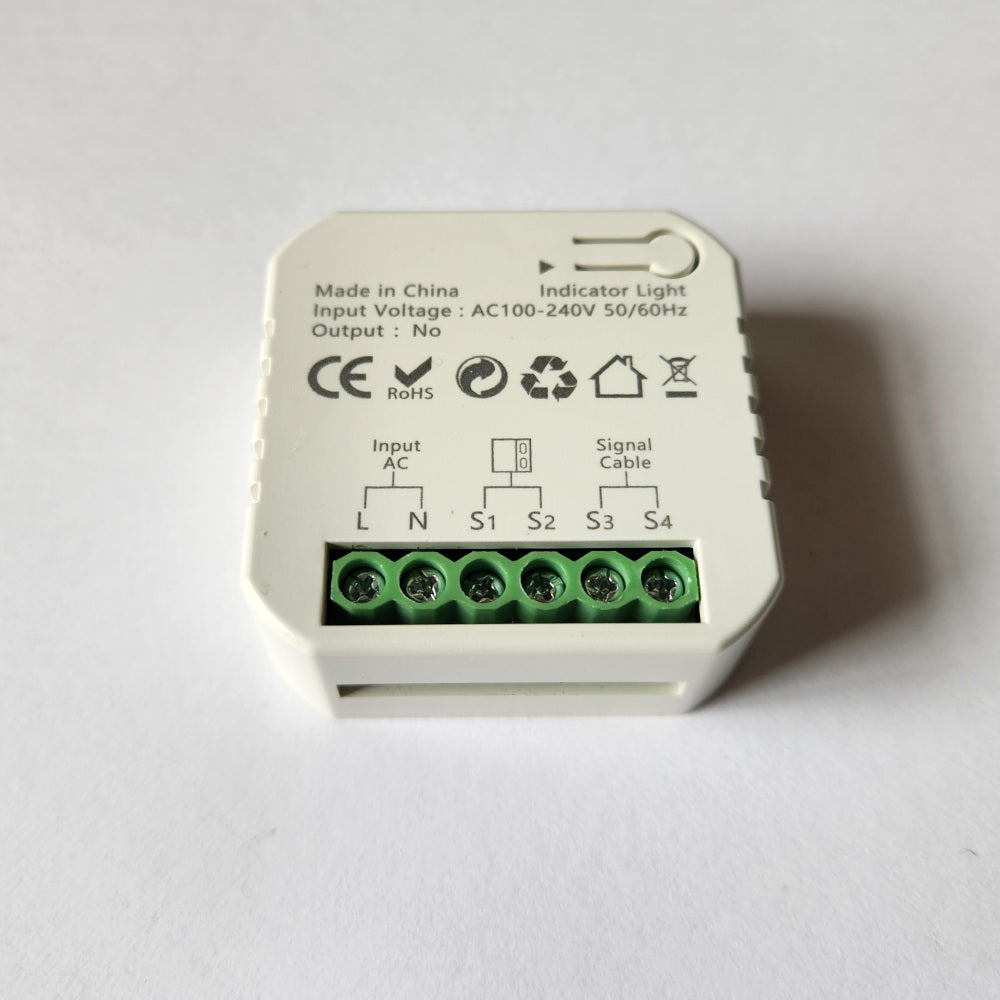
The device this was written for is the ZigBee garage door opener we stock — a dry-contact relay with the reed contact sensor in the box, mains powered so it repeats the mesh, shipped from Melbourne. You don't need to buy it from us to use the quirk; it will work on any TS0601 opener with a matching manufacturer string. But if it saved your Saturday, you know where we are.
 THE DEVICE IN THIS GUIDE ZigBee Smart Garage Door & Gate Opener ZigBee 3.0 · Dry contact · in stock in Australia →